
Hi,
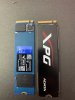
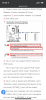
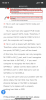
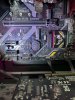
My motherboard is ASUS TUF B360M-PLUS GAMING, I bought my PC already build from LYNX. There was 2TB HDD WD Blue and 240GB M.2 SSD ADATA XPG SX8200 PCIe Gen 3x4 M.2 2280 (in M.2_1 slot) built in. As I checked there are two to me identical M.2 slots, both of these slots were working before I put in the new M.2 2280 NVMe SSD WD Blue SN570. After putting the new one in only the M.2_2 slot is reading whichever SSD I put in and M.2_1 doesnt read any of them anymore. I also attache picture from my motherboards manual where it says something about one of the slots being disabled. I did a lot of research yet I am not an expert and dont understand this issue completely and dont know how to solve this problem or if there even is a solution. I played with bios and broke and fixed my computer few times since I dont know what I am doing, but I just couldnt make my computer read the second SSD if it even can?
Help me please to make both of the M.2 slots work or just give me a final answer that the second slot will be disabled forever. I can get some pictures from my bios if necessary. Cant wait to learn more. Thank you for any response!
My motherboard is ASUS TUF B360M-PLUS GAMING, I bought my PC already build from LYNX. There was 2TB HDD WD Blue and 240GB M.2 SSD ADATA XPG SX8200 PCIe Gen 3x4 M.2 2280 (in M.2_1 slot) built in. As I checked there are two to me identical M.2 slots, both of these slots were working before I put in the new M.2 2280 NVMe SSD WD Blue SN570. After putting the new one in only the M.2_2 slot is reading whichever SSD I put in and M.2_1 doesnt read any of them anymore. I also attache picture from my motherboards manual where it says something about one of the slots being disabled. I did a lot of research yet I am not an expert and dont understand this issue completely and dont know how to solve this problem or if there even is a solution. I played with bios and broke and fixed my computer few times since I dont know what I am doing, but I just couldnt make my computer read the second SSD if it even can?
Help me please to make both of the M.2 slots work or just give me a final answer that the second slot will be disabled forever. I can get some pictures from my bios if necessary. Cant wait to learn more. Thank you for any response!
Attachments
Last edited: