- Joined
- Oct 3, 2025
- Messages
- 1
- Reaction score
- 0
This enquiry is with how to connect/set-up the various fans and LEDs. I hope that someone will be able to advise me on what to connect to which header and what to link thereafter, etc.
To set the background, I have built many PCs in the past but have to build a new one for myself as my old one died (processor and/or motherboard) and not man enough for Win11. This will be my first foray into any internal lighting and am at a loss when reading the instructions for connecting the various bits.
I am hoping that someone will be able to provide me with some definitive answers on what cable/connector goes where
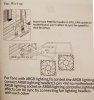
· Photo 1 - The motherboard is an Asus ROG Strix B650E-F (product code MB-6JX-AS) which has AURA RGB – the picture shows an extract of manual re the AURA header
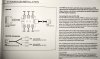
· Picture 2 - The cooler I have chosen is a Thermalright Phantom Spirit 120 SE ARGB Dual Tower CPU Cooler (product code COO-TLR-02721) – this has two fans which have ARGB lighting - the picture shows an extract from the instructions re connections
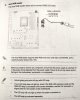
· Picture 3 - The case is a Phanteks Enthoo Pro Glass Case (product code CA-075-PT) – this has a LED control for 10 different colour presets – to control the fans there is an integrated PWB hub which can be directly controlled from the motherboard
Beyond the above I also have:
· 2 x LED ribbon strips and some connecting cables
· 3 x same fans as used with the cooler and each has connecting cables
· 2 one into three 4 pin Y splitter for RGB LED ribbon strips
What should/shouldn’t I connect to what as there appears to be a fight over access to the four-pin RGB header on the board when looking at the three photos.
Many thanks in advance for your help
Regards
John
To set the background, I have built many PCs in the past but have to build a new one for myself as my old one died (processor and/or motherboard) and not man enough for Win11. This will be my first foray into any internal lighting and am at a loss when reading the instructions for connecting the various bits.
I am hoping that someone will be able to provide me with some definitive answers on what cable/connector goes where
· Photo 1 - The motherboard is an Asus ROG Strix B650E-F (product code MB-6JX-AS) which has AURA RGB – the picture shows an extract of manual re the AURA header
· Picture 2 - The cooler I have chosen is a Thermalright Phantom Spirit 120 SE ARGB Dual Tower CPU Cooler (product code COO-TLR-02721) – this has two fans which have ARGB lighting - the picture shows an extract from the instructions re connections
· Picture 3 - The case is a Phanteks Enthoo Pro Glass Case (product code CA-075-PT) – this has a LED control for 10 different colour presets – to control the fans there is an integrated PWB hub which can be directly controlled from the motherboard
Beyond the above I also have:
· 2 x LED ribbon strips and some connecting cables
· 3 x same fans as used with the cooler and each has connecting cables
· 2 one into three 4 pin Y splitter for RGB LED ribbon strips
What should/shouldn’t I connect to what as there appears to be a fight over access to the four-pin RGB header on the board when looking at the three photos.
Many thanks in advance for your help
Regards
John